OpenCockpitOpenCockpit
Claude · Codex · DeepSeek · Kimi · Ollama

The open Claude Code GUI · Bring any agent

One seat. One AI. Everything under control.

/ˈkɒkpɪt/ — like an aircraft cockpit

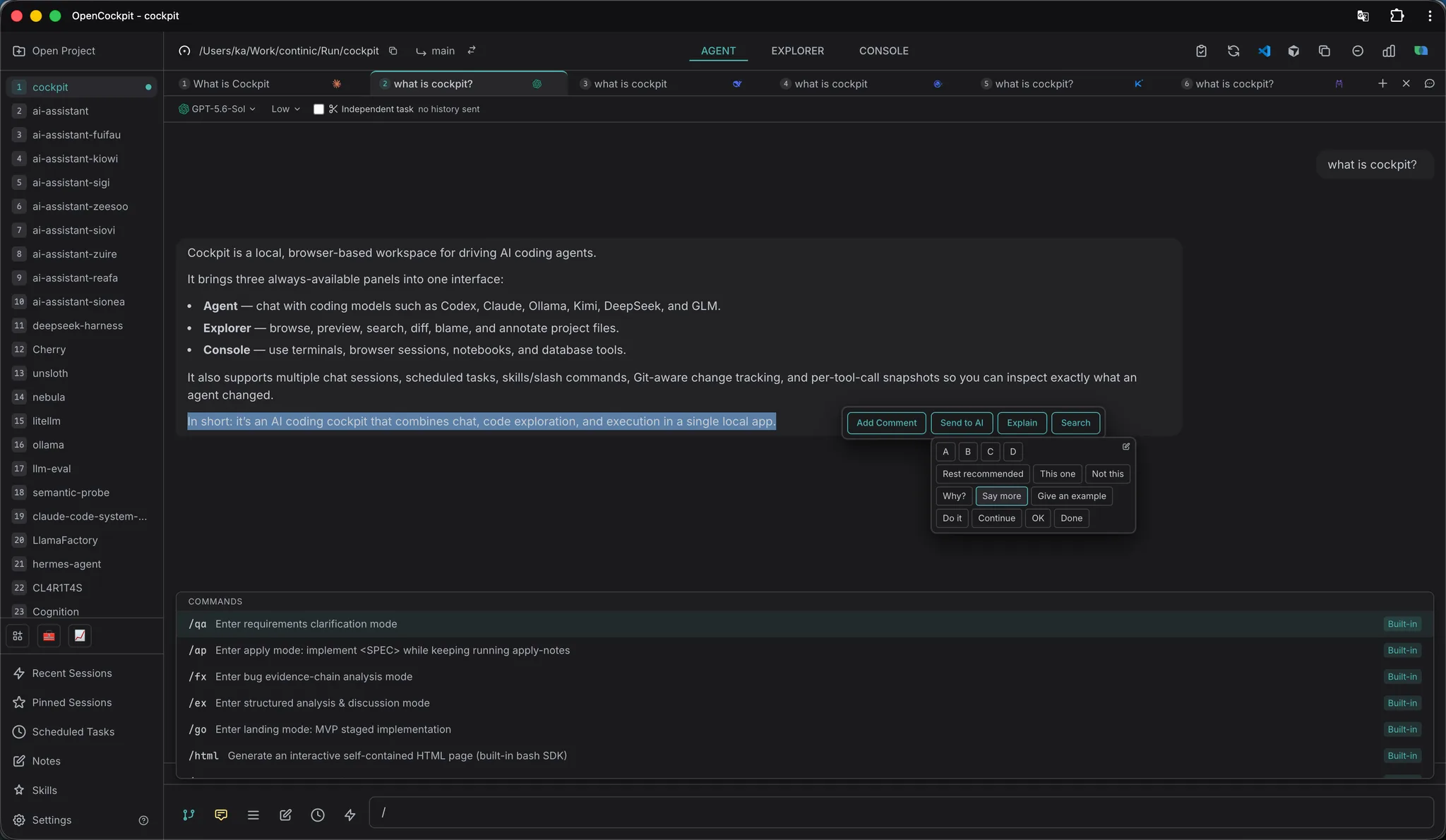
OpenCockpit is the open-source Claude Code GUI — and a single canvas for whatever agent you bring next. Multi-project Claude sessions out of the box; pop open a tab for Codex, DeepSeek, Kimi, or local Ollama whenever you need. Built-in terminal, Chrome control, PostgreSQL / MySQL / Redis bubbles, code review, and slash modes — all local.

Try OnlineStar on GitHub

Watch the 60-second tour

Why Cockpit beats raw Claude Code

Multi-project parallel sessions

Run 5+ agent sessions across projects at once. Get notified when each finishes — no terminal juggling.

Local-first, BYOK for the rest

`claude` CLI works out of the box. For Codex, DeepSeek, Kimi or Ollama, paste a key (or none for Ollama). No cloud relay, no telemetry — keys stay in `~/.cockpit/settings.json`.

Beyond chat: terminal, browser, DBs

A real xterm.js terminal, Chrome automation, PostgreSQL / MySQL / Redis — all inside one window your agent can drive.

Panel 1 · Agent

AI chat that scales with you

  • Claude out of the box via the official Agent SDK; Codex / DeepSeek / Kimi / Ollama via per-tab BYOK
  • Multi-project concurrent sessions with desktop notifications
  • Session pinning, forking, cross-project session browser
  • !command prefix runs shell from chat, output piped back as context
  • Image attachments, code references, token usage tracking
Agent
Screenshot coming soon
Agent
Agent
Panel 2 · Explorer

Code & files, all-in-one

  • Directory / Recent / Git Changes / Git History — 4 tabs
  • Syntax highlighting (Shiki) with Vi mode editing
  • Git blame, diff view, branch switching, worktree
  • LSP integration — go to definition, find references
  • Code Map — see who calls a function and what it calls; click to jump (TS/JS/Python/Go/Rust)
  • Fuzzy search (Cmd+F), JSON viewer, Markdown preview
Explorer
Screenshot coming soon
Explorer
Explorer
Panel 3 · Console

Terminal & smart Bubbles

  • Full terminal emulator (xterm.js) with shell integration
  • Browser Bubble — control Chrome via accessibility tree
  • Database Bubbles — PostgreSQL, MySQL, Redis
  • Drag-to-reorder bubbles, grid / maximized layout
  • Per-tab environment variables and shell aliases
Console
Screenshot coming soon
Console
Console

Smart Bubbles in Console

Floating panes that connect to anything — controlled by AI or by you.

🌐
Browser

Click, type, navigate, screenshot, network inspection.

🐘
PostgreSQL

Browse schema, run queries, export data.

🐬
MySQL

Browse databases & tables, run queries.

🔴
Redis

Browse keys, inspect values, execute commands.

⚙ Engines

Claude by default — bring any agent you want

Each engine runs in its own tab, with its own session history. Pick from the new-tab dropdown.

default
🟣
Claude
The default

Full Claude Agent SDK — tools, plans, slash modes. Zero setup if your `claude` CLI is already configured.

🔵
OpenAI Codex
Bring your account

Reuses your `~/.codex` config. Same chat, same shell, same bubbles — just a different tab.

🐳
DeepSeek
Long sessions on a budget

Anthropic-compatible endpoint via the Claude SDK. Paste a key, pick `v4-pro` or `v4-flash`.

🌙
Kimi
Tool calls, visible

Function calls render in chat just like Claude's — see what was called and what came back.

🦙
Ollama
Fully offline

Auto-starts the daemon, pick any pulled model from the chat header. No key, no internet required.

Keys (Codex / DeepSeek / Kimi) are stored locally in `~/.cockpit/settings.json`. No cloud relay.

Explorer · Code Map

Read the codebase like a map, not a tree

Get oriented in any unfamiliar codebase. Every function shows its body in the middle, who calls it on the left, what it calls on the right — click a pin to jump.

  • New to a repo? See every function and its connections at a glance — onboarding in minutes, not days.
  • Click a caller / callee pin to follow the trail — no more grep-and-pray.
  • Reviewing a PR? Chip-level diff shows exactly what changed inside each function, in context.
  • Tracing a bug? Walk the call graph from entry point to root cause without losing your place.
  • Reading AI-generated code? Spot every function it touches and how they connect, before you trust it.
  • Works across TypeScript / JavaScript, Python, Go, Rust — open it, no project setup needed.
Code Map
Screenshot coming soon
Code Map
Code Map

Open any file in Explorer → switch to Code Map view.

Agent · /cg Mode

Give the AI a query graph, not a grep

A code graph is the missing layer between your AI agent and your codebase. Code Map is for your eyes; CodeGraph is for the agent. The same tree-sitter index that powers Code Map is exposed as 6 HTTP endpoints — symbol search, callers, callees, impact, file tree, co-edit history — so the agent queries coordinates instead of grepping text and Reading whole files.

  • 6 endpoints answer 6 question shapes: "where is X" / "who calls X" / "X calls what" / "changing X affects what" / "what symbols in F" / "what files are edited with F".
  • Returns coordinates only (file / line range / qname) — agent uses Read with precise offset+limit to fetch source, not full files.
  • Co-edit endpoint catches "must-edit-together" file pairs that no static analysis can see: parallel registries, double-writes, sibling .md configs.
  • Incrementally synced via file watcher — no rebuild step; the index stays current across mid-PR edits and AI bulk changes.
  • /cg slash command primes the agent toward graph exploration with a question→endpoint table; existing tools (grep / glob / git log) stay available alongside.
/api/projectGraph/*
search"where is X defined?"
callers"who calls X?"
callees"what does X call?"
impact"changing X affects?"
file"symbols in file F?"
coedit"files edited with F?"
coordinates only · no source · O(1) memory query

Type /cg in any chat to enter exploration mode — the agent picks endpoints based on the question shape.

⌘ Slash Modes

One slash, one AI mindset

Slash commands flip the agent into a specific posture — talk first, debug only, never touch code. Drop any markdown into ~/.claude/commands/ to define your own.

/qaClarify

Restate the requirement, ask back on anything ambiguous, follow KISS — talk first, never code.

/fxDiagnose

Bug evidence-chain analysis. The agent reasons through the failure end-to-end and never edits a file.

/reviewReview

Reads the current diff and writes review notes — line by line, no rewrites.

/commitCommit

Stage what changed, draft a message in your repo’s style, commit.

/cgCodeGraph

Project graph exploration — six HTTP endpoints answer symbol / callers / impact / co-edit questions. Precise where grep is fuzzy.

Custom: any *.md in ~/.claude/commands/ or ./.claude/commands/ becomes a slash command — auto-loaded into the autocomplete menu.

Team · Code Review

Ship faster, together

  • LAN-shareable review pages — teammates need zero install
  • Line-level comments with reply threads
  • Send any comment back to AI as context for an automated fix
  • Red-dot badges keep unread feedback visible across projects
  • Built on top of GUIDE.md / Markdown — no separate review system
Code Review
Screenshot coming soon
Code Review
Code Review
⏱ Automation

Scheduled Tasks

One-time, interval, or cron-based scheduling. Pause, resume, reorder, track results across projects.

🧩 Extensibility

Skills

Drop in any SKILL.md to teach the agent a new trick — invoke with /skill-name from chat. Manage everything from a single Skills panel.

Built on the official Claude Agent SDK

Cockpit’s core uses Anthropic’s official Claude Agent SDK. If your `claude` CLI is configured, Cockpit works — no extra setup. Other engines (Codex, DeepSeek, Kimi, Ollama) ride on the Vercel AI SDK and the same agent loop, with keys stored locally in `~/.cockpit/settings.json`.

Next.js 16React 19TypeScriptTailwindCSSxterm.jsnode-ptyShikitree-sitter (WASM)Claude Agent SDKVercel AI SDK

Ready to fly?

Install once, then `cockpit` from any directory. (Or `cock` if you prefer the short alias.)

Try OnlineStar on GitHub